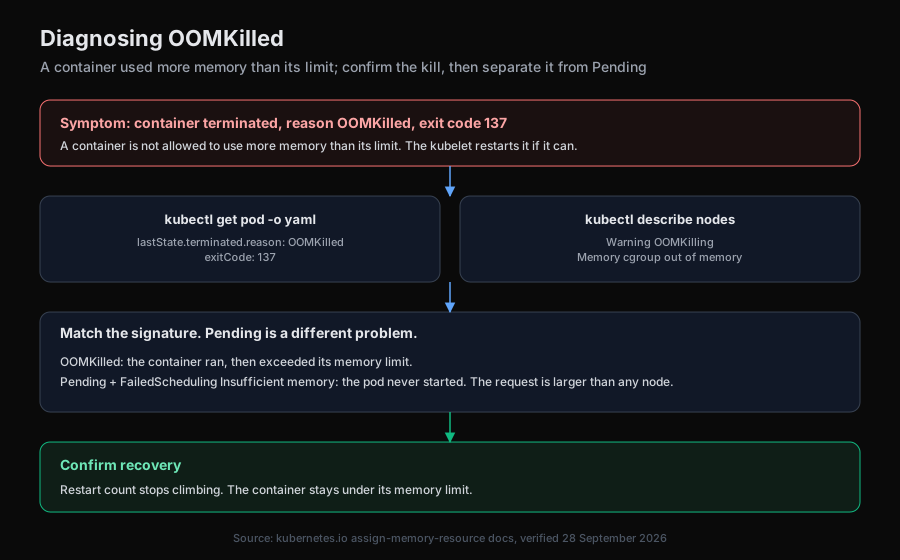
OOMKilled (exit code 137): container exceeded its memory limit (Kubernetes)
OOMKilled means the kernel killed a container for exceeding its memory limit. Confirm it, find the change behind it, fix and verify, with real lab output.

| Applies to | Kubernetes pods with a container memory limit, any runtime that reports OOMKilled |
|---|---|
| Verified on | Kubernetes v1.37.0 (server), kind v0.33.0, 2026-10-02 |
| Lab folder | scenarios/01-worker-oom, runs in runs/v0-run2/01-worker-oom |
OOMKilled with exit code 137 means the kernel killed the container because it used more memory than its resources.limits.memory. The most likely cause is a recent change that raised the working set, not a leak and not node pressure. Confirm it with kubectl describe pod <pod> and look for Reason: OOMKilled under Last State. Then either undo the change that grew the working set or raise the limit with the reason written down.
At a glance
| Signal | Likely cause | Confirm with | Fix |
|---|---|---|---|
Last State: Terminated, Reason: OOMKilled, Exit Code: 137, restarts climbing | A recent config or code change raised the working set above the limit | kubectl get deployment <name> -o yaml, compare the live spec with last-applied-configuration | Revert the change, or raise the limit with the reason recorded |
| Same signature, memory climbs between restarts | Allocation without a bound (a leak) | Watch kubectl top pod over several minutes, or compare --previous logs | Fix the allocation; a higher limit only delays the next kill (leak runbook) |
OOMKilled on a container with no limit set | The node killed it under pressure | kubectl describe nodes, look for OOMKilling | Set a limit, or expect the node to pick it again |
Pending, FailedScheduling, Insufficient memory | Not OOMKilled at all: the request is larger than any node | kubectl describe pod <pod> | Lower the request or add capacity |
Confirm: is it really OOMKilled?
Read the container state, not the pod phase. In the lab the pod showed Running as its phase while the only container inside it was being killed every few seconds. From run r1, step 6 of Aurora's investigation:
kubectl describe pod worker-86f68b9bf6-hgxwz -n shop
Status:           Running
...
    State:          Terminated
      Reason:       OOMKilled
      Exit Code:    137
      Started:      Fri, 02 Oct 2026 16:26:32 +0000
      Finished:     Fri, 02 Oct 2026 16:26:32 +0000
    Last State:     Terminated
      Reason:       OOMKilled
      Exit Code:    137
      Started:      Fri, 02 Oct 2026 16:25:50 +0000
      Finished:     Fri, 02 Oct 2026 16:25:50 +0000
    Ready:          False
    Restart Count:  4
    Limits:
      memory:  192Mi
    Requests:
      cpu:     50m
      memory:  64Mi
    Environment:
      BATCH_SIZE:  2500
Started and Finished carry the same second: the process died within a second of starting, which is what a batch allocation that exceeds the limit looks like. The events at the bottom of the same output show the kubelet doing its job, nothing more:
  Normal   Started    3s (x5 over 84s)  kubelet            spec.containers{worker}: Container started
  Warning  BackOff    2s (x4 over 82s)  kubelet            spec.containers{worker}: Back-off restarting failed container worker in pod worker-86f68b9bf6-hgxwz_shop(...)
The Kubernetes memory resources page describes exactly this: "If a Container allocates more memory than its limit, the Container becomes a candidate for termination. If the Container continues to consume memory beyond its limit, the Container is terminated. If a terminated Container can be restarted, the kubelet restarts it, as with any other type of runtime failure." That restart loop is why the same pod shows CrashLoopBackOff a minute later, as it did in run r2:
NAME                        READY   STATUS             RESTARTS      AGE
worker-86f68b9bf6-thj65     0/1     CrashLoopBackOff   4 (73s ago)   2m56s
Look-alikes to rule out before you touch anything:
CrashLoopBackOffwithReason: Errorand a non-137 exit code is an application crash. Steps for the backoff itself are in how to fix CrashLoopBackOff.PendingwithFailedSchedulingandInsufficient memorywas never started. Scheduling uses the request, not the limit.Exit Code: 137with noOOMKilledreason can be a SIGKILL from a failed liveness probe or an eviction. Check the events.
Scope: how much is affected, since when, after which change?
Three commands answer all three questions. First, who else is hurt. Run r1, step 4:
kubectl get pods -n shop -o wide
NAME                        READY   STATUS      RESTARTS      AGE
api-f64486c4c-dxmf8         1/1     Running     0             75s
api-f64486c4c-w5pvs         1/1     Running     0             75s
frontend-76d98597b9-8xkmw   1/1     Running     0             75s
frontend-76d98597b9-jnq4f   1/1     Running     0             75s
loadgen-7c6676864-g44sc     1/1     Running     0             75s
redis-59458f55d8-6ft5c      1/1     Running     0             75s
worker-86f68b9bf6-hgxwz     0/1     OOMKilled   3 (50s ago)   67s
One workload, and it has a single replica, so whatever the worker does is not happening at all. Second, is the node under pressure. Run r2, step 11:
kubectl top nodes
NAME                       CPU(cores)   CPU(%)   MEMORY(bytes)   MEMORY(%)
aurora-lab-control-plane   96m          0%       727Mi           3%
aurora-lab-worker          21m          0%       159Mi           0%
aurora-lab-worker2         32m          0%       198Mi           0%
Nodes at 0 to 3 percent memory rule out node pressure and eviction. The kill came from the container's own limit. Third, since when. The ReplicaSets tell you a rollout happened, and the pod's age tells you the crashes started with it. Run r2, step 12:
kubectl get replicaset -n shop -l app=worker
NAME                DESIRED   CURRENT   READY   AGE
worker-6cf88d4b58   0         0         0       3m46s
worker-86f68b9bf6   1         1         0       3m39s
A new ReplicaSet seven seconds after the old one, with zero ready pods, is a change that broke the workload on arrival. kubectl rollout history would name the revision, if your policy allows it (see the lab section below).
Isolate: which change grew the working set?
Start with the cheapest check that distinguishes the two common causes: a step change in configuration, or a slow climb. The previous container's own log is the first thing to read. Run r2, step 6:
kubectl logs worker-86f68b9bf6-thj65 -n shop --tail=100 --previous
worker started, batch size 2500
One line, then death. There is no climb to watch; the process allocates its batch at startup and exceeds the limit immediately. If --previous returns unable to retrieve container logs (run r1 got unable to retrieve container logs at step 9; the killed container was no longer available to the runtime), go straight to the spec.
Compare what is running with what was last applied. Run r1, step 7:
kubectl get deployment worker -n shop -o yaml
metadata:
  annotations:
    deployment.kubernetes.io/revision: "2"
    kubectl.kubernetes.io/last-applied-configuration: |
      {"apiVersion":"apps/v1","kind":"Deployment",...,"env":[{"name":"BATCH_SIZE","value":"500"}],...}
  generation: 2
...
      containers:
      - command:
        - python
        - -u
        - /code/worker.py
        env:
        - name: BATCH_SIZE
          value: "2500"
        image: python:3.12-alpine
        resources:
          limits:
            memory: 192Mi
          requests:
            cpu: 50m
            memory: 64Mi
The live spec says BATCH_SIZE=2500. The last-applied-configuration annotation, which kubectl apply writes, still says 500. Something changed the Deployment outside the tracked manifest (in the lab, kubectl set env deploy/worker BATCH_SIZE=2500). That annotation diff is the single most useful artifact in an OOMKilled investigation, because it hands you both the cause and the rollback in one read.
Then confirm the arithmetic against the code, so you know whether 2500 is a bug or a new requirement. Run r1, step 10, from the api-code ConfigMap:
batch = int(os.environ.get("BATCH_SIZE", "500"))
print(f"worker started, batch size {batch}", flush=True)
while True:
    # Each queued item holds about 100 KiB while the batch is processed.
    buf = [bytearray(100 * 1024) for _ in range(batch)]
2500 items at 100 KiB each is about 244 MiB, against a 192Mi limit. 500 items is about 49 MiB. The limit was never the problem; the batch size was.
When the annotation diff is empty, the change came through a normal apply and lives in version control, or there was no change and you are looking at a leak (see OOMKilled from a slow memory leak). For a leak, kubectl top pod sampled over minutes shows memory climbing toward the limit between restarts, and the previous log shows the process running for a while before it dies.
Fix: revert the change or raise the limit?
Revert when the change was unintended or untested, which is the usual case. Undo the drifted variable with the same verb that caused it:
kubectl -n shop set env deploy/worker BATCH_SIZE=500
Risk: this is a rollout, so the pod restarts once more. For a single-replica worker that is already down, there is nothing left to lose. Rollback: set the value back to 2500, which puts you where you started. If the Deployment is managed by kubectl apply or a GitOps tool, re-applying the tracked manifest does the same thing and also removes the drift.
Raise the limit only when the larger working set is a real requirement and the process is stable under it. For 2500 items you need headroom above 244 MiB, so 320Mi is the smallest round number that leaves a margin. Edit resources.limits.memory in the tracked manifest and apply it, so the annotation and the live spec agree. Risk: a higher limit on a node without the room moves the problem to the scheduler or to the node OOM killer. Rollback: re-apply the previous manifest.
Do not combine both changes at once. If you revert the batch size and raise the limit together, you will not know which one stopped the kills, and the next person to raise BATCH_SIZE learns nothing from the limit.
Verify: what counts as fixed?
The container's last termination reason stops being OOMKilled and the restart count stops moving. The lab's own check for "still broken" is a one-liner you can invert:
kubectl -n shop get pods -l app=worker -o jsonpath='{.items[*].status.containerStatuses[0].lastState.terminated.reason}'
While broken it prints OOMKilled. After the fix the new pod has no terminated last state, so it prints nothing. Then watch for two batch cycles, in this app ten seconds, and confirm the pod is 1/1 Running with RESTARTS at 0:
containerStatuses[0] reads only the first container. If the pod has a sidecar, check every container: see sidecar container OOMKilled.
kubectl -n shop get pods -l app=worker -w
If the restart count moves again at the new setting, the working set is still above the limit, and you are now looking at a second cause.
Prevent: how do you catch the next one before the pager does?
Alert on the termination reason, not on restarts. With kube-state-metrics, kube_pod_container_status_last_terminated_reason{reason="OOMKilled"} is 1 for a container whose last termination was an OOM kill (kube-state-metrics pod metrics). An alert on that series firing for five minutes names the container and the reason in one line, instead of a generic KubePodCrashLooping.
Guardrails:
- Treat a non-empty diff between the live spec and
kubectl.kubernetes.io/last-applied-configurationas a finding. Drift is how this incident happened. GitOps tools surface it as "OutOfSync"; without one, a scheduledkubectl diffagainst the repo does the same. - Put the memory math next to the knob. A comment on
BATCH_SIZEthat says "100 KiB per item, limit 192Mi, keep under 1800" would have stopped this change in review. - Give the limit a reason in the manifest. A limit nobody can explain gets raised blindly the next time this fires.
Common mistakes
- Raising the limit first. It makes the kills stop and hides a leak or an unreviewed change. In this case the change was the bug; 320Mi would have "fixed" a worker that then needs 400Mi next quarter.
- Reading the pod phase.
Status: Runningwas true in run r1 while the container was dying every second. ReadcontainerStatuses. - Treating restarts as evidence. A restart count climbs for probe failures and application crashes too. Only
Reason: OOMKilledwithExit Code: 137is an OOM kill. - Blaming the node.
kubectl top nodesat 0 to 3 percent memory settles it in one command. Eviction and node pressure leaveEvictedpods and node events, notOOMKilledcontainers. - Trusting
kubectl logswithout--previous. The current container may have one line or nothing. The killed one had the evidence, and in run r1 it was already gone.
What we saw in the lab
The scenario is 01-worker-oom: a healthy shop namespace on a 3-node kind cluster, then kubectl -n shop set env deploy/worker BATCH_SIZE=2500 against a 192Mi limit. Aurora got only the alert text, KubePodCrashLooping: pod worker in namespace shop is restarting repeatedly, a kubeconfig, and read-only kubectl under its default observability_only policy. Each run used a fresh user and org. Model: bedrock/us.anthropic.claude-sonnet-5, Aurora commit 87d22baf, single agent.
| Run | Verdict | Time | Tool calls | Cost |
|---|---|---|---|---|
| r1 | correct (judge, second model and human review agree) | 91 s | 12 | $0.25 |
| r2 | correct (same) | 228 s | 14 | $0.35 |
Both runs met both required findings: the container is OOMKilled rather than crashing for another reason, and the trigger is the BATCH_SIZE change from 500 to 2500. Neither asserted the two wrong answers the scenario lists, a memory leak or node pressure. Both suggested the acceptable fix, reverting BATCH_SIZE to 500, and r1 also offered raising the limit to 320Mi with the reason stated.
r1's path, in order: list open incidents, search memory (empty), list clusters, get pods -o wide, get events --sort-by=.lastTimestamp, describe pod (the OOMKilled state above), get deployment -o yaml (the annotation diff), rollout history (blocked, see below), logs --previous (unavailable, garbage collected), get configmap api-code -o yaml (the 100 KiB per item line), top pods, then it wrote a memory entry titled "shop/worker OOMKilled from BATCH_SIZE env drift". Its report put the cause as "a drifted environment variable on the worker deployment: the live spec sets BATCH_SIZE=2500, while the kubectl.kubernetes.io/last-applied-configuration annotation ... shows BATCH_SIZE=500, indicating an out-of-band change".
r2 took a different route to the same answer: after get pods and get events it went to logs --previous (step 6), which worked this time and returned worker started, batch size 2500, then describe pod, the ConfigMap, rollout history (blocked again), the Deployment YAML, top nodes and the ReplicaSets. Its root cause states the arithmetic: "BATCH_SIZE=2500 requires ~244MiB while the container's memory limit is 192Mi".
Two things went wrong, and both are worth knowing about:
kubectl rollout historywas denied in both runs with "Command blocked by organization policy: Mutating kubectl operations". The command is read-only; Aurora's default deny rule matched the wholerolloutverb. Aurora worked around it by diffing the ReplicaSets and the annotation, and both reports listed the blocked call under "Not checked" rather than guessing at the history. The policy has since been narrowed on a lab branch to deny onlyrollout restart|undo|pause|resume; details are in the lab report.- Neither report stated a remediation. The judge flagged both. The fixes were in Aurora's separate "Suggested Next Steps" list, which the first version of the grader never read: both runs proposed reverting
BATCH_SIZEto 500 and both offered raising the limit to 320Mi with the reason stated. Graded on everything Aurora showed the user, both runs are correct and their fixes acceptable.
Both reports also carried an honest "Not checked" section: the blocked rollout history, the unavailable previous log in r1, and the absence of prior incidents in memory. Neither claimed the author or time of the change, which no command they were allowed to run could reveal.
How Aurora handles this
Aurora receives the alert and investigates on its own with read-only kubectl behind an allowlist, so by default it cannot change the cluster while it looks. For OOMKilled it reads the container state, the events, the Deployment spec against its last-applied-configuration annotation, the code or config that sets the working set, and node and pod metrics, then writes a root cause with a numbered citation for each claim and a separate list of suggested fixes. Anything it could not verify goes in a "Not checked" section instead of the root cause. The full traces for both lab runs are in the lab repository.
- Start free: aurora-ai.net (hosted, no infrastructure to run)
- GitHub: github.com/Arvo-AI/aurora
- Book a demo: cal.com/arvo-ai/demo
- See it on an incident: Aurora root cause analysis
Related: ImagePullBackOff runbook, a rollout stuck on an init container, root cause analysis guide for SREs, and an OOMKilled worker alongside a second, unalerted fault.
Sources and verification
- Every command output on this page is pasted from Aurora's recorded tool calls in runs/v0-run2/01-worker-oom (files
steps-full.json,aurora-rca.md,grade.json,result.json) or from the cluster state captured before the investigation (evidence-before/), trimmed with...where noted and otherwise unchanged. Run date 2026-10-02. - Cluster: kind v0.33.0, Kubernetes server v1.37.0, from
evidence-before/versions.yaml. Aurora commit87d22baf, modelbedrock/us.anthropic.claude-sonnet-5. - The termination rule, the kubelet restart sentence and the
OOMKilled/137signature are quoted from the Kubernetes page Assign Memory Resources to Containers and Pods, checked 2026-10-08. kube_pod_container_status_last_terminated_reasonis documented in the kube-state-metrics pod metrics reference, checked 2026-10-08.- Aurora's default command policy and the fix branch are described in the lab's REPORT.md and FINDINGS.md.